
PHONE SECURITY
How to Check Your Phone for Spyware, and How to Stop It Getting On
Most people will never be targeted by Pegasus. But spyware isn't only a problem for journalists and diplomats anymore. Cheap stalkerware apps are sold openly, and the expensive "mercenary" tools keep turning up on the phones of lawyers, activists and business people. This guide covers what these tools can actually do, how they get onto a phone, how to check yours with MVT, and the settings that make you a much harder target.
Spyware, malware, stalkerware: what are we talking about?
People use these words loosely, so here's what each one means.
Malware is the broad term for any software built to do something you didn't agree to. Most of it is fairly dumb and opportunistic: fake apps that steal banking logins, adware, or software that signs you up to premium SMS services.
Spyware is malware whose whole job is to watch you. At the top end are commercial products such as NSO Group's Pegasus, Intellexa's Predator and Paragon's Graphite. They're sold to governments, cost serious money per target, and are built to stay hidden.
Stalkerware sits at the other end. These are monitoring apps, often marketed for "keeping an eye on your kids" or "catching a cheating partner", that someone installs on your phone while they have it in their hands. They're far less sophisticated, but for most people they're the more realistic threat.
The difference matters, because the way you protect yourself, and the way you check, depends on which one you're worried about.
What these tools can do once they're on a phone
Modern spyware doesn't bother breaking your encryption. Signal, WhatsApp and every other encrypted app have to decrypt your messages so you can read them, and once spyware has control of the phone, it simply reads them at that point, the same way you do.
Depending on the product and how deep the infection goes, it can:
- Read your messages, emails and chat history, including encrypted apps
- Copy photos, files, contacts and call logs
- Track your location in real time
- Switch on the microphone or camera without any sign on the screen
- Take screenshots, or log what you type
- Pull saved passwords and the login tokens for your cloud accounts, so the attacker can keep reading your email or iCloud even after the phone itself is cleaned
That last point is the one people miss. Getting rid of the implant is only half the clean-up. If it took your account tokens, you also need to change your passwords and sign out of every session.
The good news, if you can call it that, is that the high-end tools tend to be careful. Many recent Pegasus infections don't survive a restart, because staying on the phone permanently leaves more traces for investigators to find. The attackers would rather re-infect you than get caught.
Who makes these tools
It helps to know the names, because they come up in every news story about this, and because two quite different industries are involved: companies that break into phones remotely, and companies that break into phones someone has physically taken.
NSO Group and Pegasus
NSO Group is an Israeli company, and Pegasus is the reason most people have heard of phone spyware at all. NSO says it sells only to governments, for fighting crime and terrorism. The record says otherwise.
In 2021, a group of 17 media organisations working with Forbidden Stories and Amnesty International published the Pegasus Project. It was built on a leaked list of more than 50,000 phone numbers believed to have been selected as possible targets by NSO's government clients. Amnesty's Security Lab then examined phones belonging to people on the list and found Pegasus infections on the devices of journalists, human rights activists and people close to the murdered Saudi journalist Jamal Khashoggi. MVT is the tool they built to do those checks, and it's the one we walk through below.
The fallout was serious. Later in 2021 the US government put NSO on its Entity List, which restricts American companies from doing business with it. Apple sued NSO the same year (it dropped the case in 2024, saying the risk of exposing its own threat intelligence had become too high). WhatsApp's lawsuit over the 2019 attack ended with a US court finding NSO liable, and in 2025 a jury ordered it to pay damages.
Pegasus is the best known, but it isn't unique. It's just the one investigators have documented most thoroughly.
Predator, Graphite and the rest
- Predator, sold by the Intellexa alliance, has been found on the phones of journalists and politicians in Greece, Egypt and elsewhere. It was the spyware behind the Egyptian network-injection case described below. The US government sanctioned Intellexa and people connected to it in 2024.
- Graphite, made by Paragon Solutions, is the tool behind the 2025 WhatsApp campaign, and was found on the phones of journalists in Italy. Paragon presented itself as the responsible alternative to NSO.
- Hermit, from the Italian company RCS Lab, was found in 2022 targeting Android and iPhone users in Kazakhstan and Italy.
- FinFisher sold its FinSpy spyware to governments for years before the company went insolvent in 2022, while German prosecutors were investigating its exports.
The business model is the same across all of them: a paying government client chooses targets, and the vendor supplies the exploits and the infrastructure.
Phone-cracking tools: Cellebrite, Magnet Forensics and others
The second industry doesn't need to reach your phone over the internet. It needs your phone in its hands.
Cellebrite, an Israeli company, is the best-known name. Its UFED and Premium products are used by police, border agencies and militaries around the world to unlock seized phones and copy their contents. Magnet Forensics makes GrayKey, a box built to get into iPhones (it merged with GrayKey's original maker, Grayshift, in 2023), along with AXIOM for analysing what's been extracted. Others include MSAB with XRY, and Oxygen Forensics.
These tools work by guessing the passcode, or by using undisclosed security holes, often in the code that handles the USB connection, to get around the lock screen and the limits on guessing. Depending on the phone and its software version, they can pull out messages, photos, location history, app data and saved passwords. How much they get depends heavily on the phone's state. A phone that has been unlocked at least once since it was last turned on (called AFU, After First Unlock) has its encryption keys loaded in memory and gives far more away than one that has just been restarted (BFU, Before First Unlock).
The companies keep their support lists secret, but some have leaked. Cellebrite documents published in 2024 showed which iPhones and Android phones it could and couldn't get into at the time, and listed fully updated GrapheneOS Pixels among the ones it couldn't. A leaked GrayKey list later the same year showed only partial access to iPhones running the newest version of iOS. Those lists change all the time, so treat them as a snapshot, not a promise.
The line between the two industries isn't as clean as it sounds. In December 2024 Amnesty reported that police in Serbia had used Cellebrite to unlock the phones of a journalist and activists they'd detained, then quietly installed spyware called NoviSpy before handing the phones back. Amnesty also found that a Cellebrite exploit for Android phones relied on undiscovered bugs in USB drivers, which Google then fixed.
This is why some of the advice further down is about physical access: a long passcode, restarting your phone before a situation where it might be taken (a border crossing, a protest, an arrest), and blocking the USB port while the phone is locked.
How spyware actually gets onto a phone
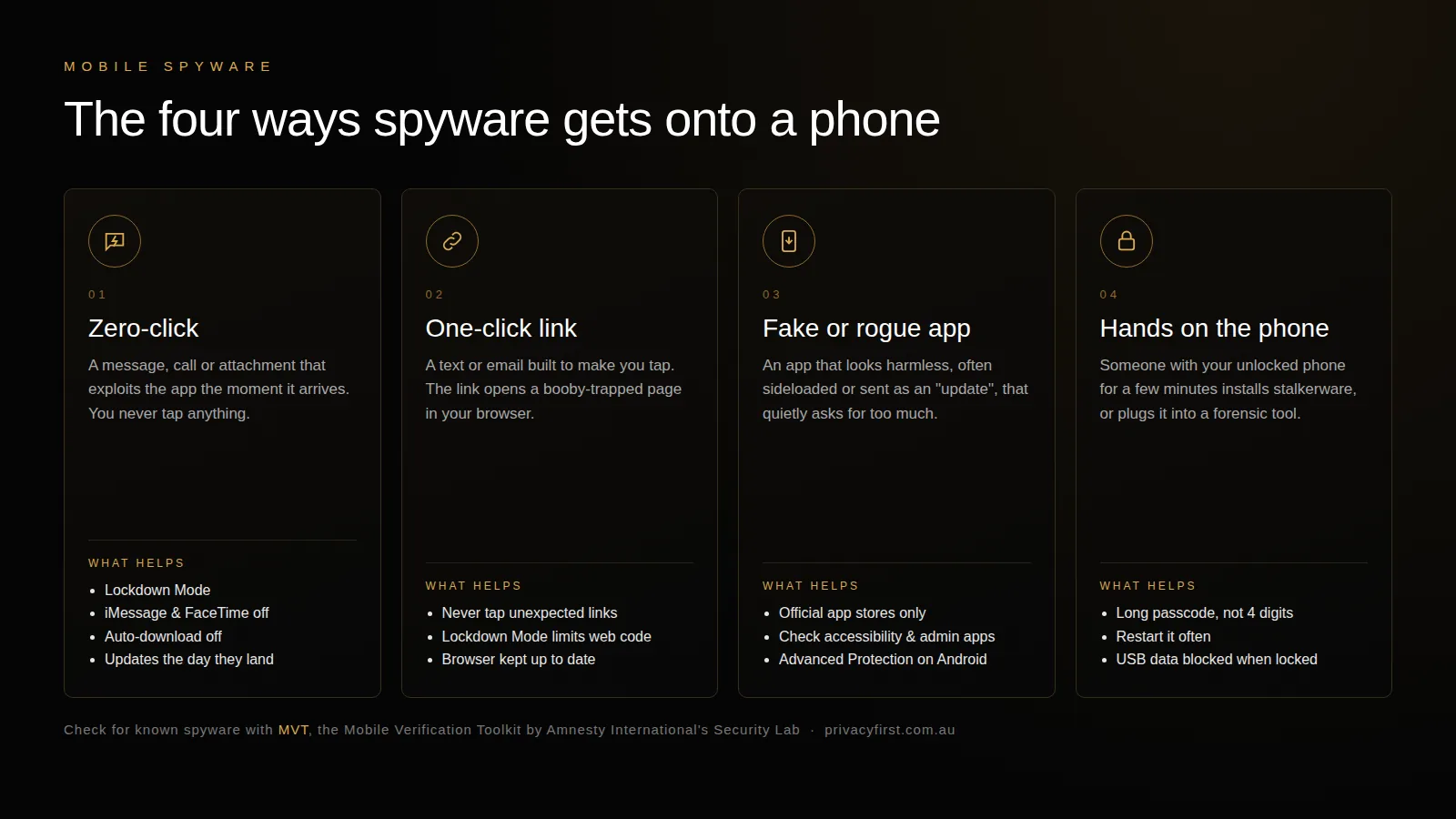
There are really only four routes in. The diagram above sums them up; here's what each looks like in practice.
1. Zero-click: you don't do anything at all
This is the one that makes headlines. The attacker sends something to an app that processes incoming content automatically (a message, an image, a missed call) and a bug in that processing gives them control of the phone. You never tap a thing.
Some real examples:
- WhatsApp, 2019. A flaw in WhatsApp's calling feature let Pegasus be installed with a single call, even if the person never answered. Around 1,400 people were targeted. WhatsApp later sued NSO Group, and won in a US court in 2025.
- FORCEDENTRY, 2021. Citizen Lab found a zero-click iMessage exploit that hid a malicious file inside what looked like a GIF. Apple patched it after it was found on a Saudi activist's iPhone.
- BLASTPASS, 2023. Another iMessage attack, this time using booby-trapped images inside PassKit (Apple Wallet) attachments. Citizen Lab noted that Apple's Lockdown Mode blocked it.
- Paragon's Graphite, 2025. WhatsApp said around 90 users, including journalists and members of civil society, had been targeted through malicious files shared in group chats.
The pattern is the same every time. The weak spot is the code that handles messages, images and calls from strangers before you've decided whether you want them. Most of the settings further down are about shutting that code off.
2. One-click: a link you're tricked into tapping
Cheaper and still very common. You get a text, email or DM that's written to make you tap: a parcel that couldn't be delivered, a news story about you, a message that looks like it's from your bank. The link opens a web page that exploits your browser.
A nastier version is network injection. In 2023 Citizen Lab showed that an Egyptian politician's phone was redirected to an infection page just by visiting an ordinary website over an unencrypted connection, because the attacker had help from the mobile network. No suspicious link was needed.
3. A fake or rogue app
Mostly an Android problem. The Hermit spyware found in 2022 was spread as fake apps from phone carriers and messaging services, sometimes after the target's mobile data had been deliberately cut off and a text arrived offering an app to "fix" it. Stalkerware is often installed the same way, sideloaded outside the Play Store.
4. Someone with the phone in their hands
The least glamorous route, and by far the most common for ordinary people. A partner, ex, family member or employer has your unlocked phone for a few minutes and installs a monitoring app. At the professional end, police and border agencies use the forensic tools described above, such as Cellebrite and GrayKey, on phones they've seized.
Signs to look for, and why they're unreliable
You'll see plenty of lists online: battery draining faster, the phone running warm, more data use than usual, strange pop-ups. Treat them with scepticism.
Stalkerware can give itself away like this, especially cheaper apps that upload a lot of data. Mercenary spyware is designed not to. A phone infected with Pegasus usually feels completely normal. A flat battery is far more likely to be an app update or an old battery than an implant.
The more useful signals are things like an app you don't remember installing, an app with accessibility or "device admin" access that has no business having it, a configuration profile on an iPhone you didn't add, or a threat notification from Apple, Google or WhatsApp. Apple sends these to people it believes have been targeted by mercenary spyware, and has done so in more than 150 countries. If you get one, take it seriously.
For anything beyond that, you need a proper forensic check.
Checking your phone with MVT
MVT, the Mobile Verification Toolkit, is a free, open-source tool from Amnesty International's Security Lab. It was released in 2021 alongside the Pegasus Project investigation, and it's the same tool researchers use to confirm infections. It works on both iPhone and Android.
MVT isn't an antivirus app, and the difference matters. Instead of scanning for anything suspicious, it collects forensic records from the phone (backups, logs, lists of processes and apps) and compares them against indicators of compromise: the known domains, file names and process names left behind by specific spyware campaigns that researchers have already documented.
That means two things. If MVT finds a match, it's significant. If it finds nothing, that's reassuring but it isn't proof. MVT's own documentation says plainly that public indicators can't confirm a phone is clean, because the newest campaigns won't be in them yet.
What MVT actually looks at
On an iPhone, MVT goes through the records in a backup: your text messages and their attachments, Safari, Chrome and Firefox history, WhatsApp messages, call history, the list of installed apps and configuration profiles, the database of which apps have been given camera, microphone and other permissions, and the records iOS keeps of which processes have used the network. That last one has been key in past Pegasus cases, because the spyware's processes show up there under odd names. It checks links in your messages and browsing history against domains known to have been used in infection attempts.
A sysdiagnose archive adds system logs, including the shutdown log, where researchers at Kaspersky found in 2024 that Pegasus infections leave telltale traces.
On Android, MVT works through what androidqf collects: every installed app (and, if you allow it, a copy of each one so it can be checked against known malicious files), the processes running at the time, system settings such as whether installing from unknown sources or Play Protect has been changed, signs that the phone has been rooted, and the system logs.
Before you start
- A Mac or Linux computer is easiest. Windows works through WSL.
- A recent version of Python 3, and some comfort with a terminal.
- A USB cable for the phone.
- About an hour, most of it waiting for backups.
Install MVT
The simplest way is with pip:
pip3 install mvtOr, if you use uv:
uv tool install mvtThen download the latest indicators. MVT checks for new ones itself, but it doesn't hurt to grab them first:
mvt download-iocsChecking an iPhone
On an iPhone, MVT works from a backup, and it needs to be an encrypted one. Encrypted backups include far more of the records MVT looks at, which is why they're worth the extra step.
- Connect the iPhone and make an encrypted backup. On a Mac, use Finder. On Windows, use Apple Devices (or iTunes on older versions). Tick "Encrypt local backup" and choose a password you'll remember. On Linux,
idevicebackup2from libimobiledevice does the same job. - Decrypt the backup into a new folder with MVT:
mvt-ios decrypt-backup -p "your backup password" -d ./decrypted /path/to/backup- Run the check:
mvt-ios check-backup --output ./results ./decryptedOn a Mac, the backup lives in ~/Library/Application Support/MobileSync/Backup/, in a folder named after your phone's ID.
MVT can also read an iPhone sysdiagnose archive (mvt-ios check-sysdiagnose), the diagnostic bundle you can create on the phone itself. It's a handy extra check, particularly if a backup isn't practical.
Checking an Android phone
For Android, the current version of MVT has dropped its old direct-connection command. Data is now collected with a companion tool, androidqf, also maintained by Amnesty's Security Lab, and MVT checks what it collects.
- On the phone, turn on Developer options and enable USB debugging.
- Download androidqf for your computer from its releases page, connect the phone and run it. Approve the "Allow USB debugging?" prompt on the phone. androidqf will ask you a few questions as it goes, such as whether to include a backup of your SMS, then save everything it collects into an archive on your computer.
- Point MVT at what androidqf saved:
mvt-android check-androidqf --output ./results /path/to/androidqf-acquisitionOn Android 16, if you've turned on Advanced Protection, the phone can keep intrusion logs, and MVT can check those as well with mvt-android check-intrusion-logs. When you're done, turn USB debugging back off.
Reading the results
MVT writes a JSON file for each thing it checked into your results folder. Anything that matched a known indicator also goes into files with _detected in their name, along with a timeline of events. No _detected files means no known indicators were found.
If something does show up, don't wipe the phone straight away. You'll destroy the evidence someone would need to confirm it. Put the phone aside, use a different device, and get expert help (see below).
Not comfortable with a command line?
MVT is built for researchers, and it shows. If backups and terminals aren't your thing, we've made a web-based version that walks you through the check step by step. Run a spyware scan online.
The same caveat applies to any tool, ours included: it can find known spyware, but a clean result can't prove a phone has never been targeted.
How to make yourself a much harder target
Checking for spyware is useful. Not getting infected in the first place is better. Below is every setting we'd recommend, what it actually changes, and why it gets in an attacker's way. Most of them take a minute.
For everyone, on any phone
- Install updates the day they arrive. Every attack mentioned in this article stopped working once the bug behind it was patched, usually within days of being found. The attackers' business model depends on people sitting on old software for weeks. On an iPhone, also leave the automatic security responses switched on (Settings, General, Software Update, Automatic Updates) so urgent fixes install without waiting for a full update.
- Restart your phone regularly. Much of today's high-end spyware lives only in the phone's memory, because writing itself to storage leaves traces investigators can find. A restart clears memory, so the attacker has to break in all over again, with all the risk of being caught that comes with it. The US National Security Agency's advice is to restart at least once a week; daily is better and costs you nothing. A restart also puts the phone back into its "Before First Unlock" state, where your data is encrypted with keys that aren't loaded yet. We explain why that matters in AFU vs BFU.
- Use a proper passcode. A four-digit PIN has 10,000 possible combinations. A six-digit one has a million. A passcode with letters and numbers has more than any forensic tool can realistically get through. The phone's security chip slows down guessing, but the length of the code is still what decides whether a seized phone can be cracked in hours or not at all.
- Only install apps from the official store, and delete the ones you don't use. Store apps are scanned and reviewed, which isn't perfect but catches a lot. Sideloaded apps skip all of that. Every app you keep is also more code that could have a bug in it.
- Don't tap links you weren't expecting, even from people you know, because their account may have been taken over. Parcel notices, "is this you in this photo?" and bank warnings are the classic one-click bait. If something looks important, go to the website or app yourself instead.
- Keep the phone with you, locked. Stalkerware needs a few minutes with an unlocked phone. While you're checking, look for things someone with access might have added: an extra face in Face ID ("Set Up an Alternate Appearance"), a fingerprint you didn't register, location sharing in Find My or Google Maps you didn't set up, or unfamiliar devices signed in to your Apple or Google account.
On an iPhone: Lockdown Mode
Lockdown Mode is a single switch (Settings, Privacy & Security, Lockdown Mode) that Apple built for people who might be targeted by mercenary spyware. The idea behind it is simple. Zero-click attacks work by finding a bug in some piece of code that runs automatically when something arrives from a stranger. Lockdown Mode switches a lot of that code off, so there's far less for an attacker to aim at.
Here's what it changes, and why each one matters:
- Most message attachments are blocked. Messages only accepts certain images, video and audio. Everything else, like PDFs, Wallet passes and unusual file types, never arrives. This matters because every file type needs its own decoding code, and that code runs as soon as the message lands so your phone can show a preview. FORCEDENTRY hid a malicious file inside what claimed to be a GIF. BLASTPASS hid malicious images inside a Wallet (PassKit) attachment. Both relied on the phone processing a file type most people never send each other, which is exactly what Lockdown Mode refuses.
- Links and link previews in Messages are switched off. To build a preview, your phone goes and fetches the page and the picture behind a link, automatically. That's more stranger-supplied content being processed without you asking. With Lockdown Mode on, links in Messages aren't tappable or previewed at all.
- Some complex web technologies are disabled in Safari, the main one being "just-in-time" (JIT) JavaScript compilation. JIT is what makes modern websites fast: it turns a page's code into machine code on the fly. It's also one of the most common places for browser exploits, because a small mistake there can let a web page run its own code on your phone. Turning it off makes some sites slower, and a few may break, but it shuts the door that most one-click link attacks walk through. You can exclude websites you trust.
- Incoming FaceTime calls are blocked unless you've called that person before. Setting up a call means your phone processes data from the caller before you've decided to answer. WhatsApp's 2019 attack worked exactly this way, and the same year a bug in Group FaceTime let callers hear audio from the other phone before anyone picked up. If a stranger can't reach you, they can't try either.
- Invitations from strangers are blocked. Shared albums are removed, and invitations to Apple services such as Home are blocked unless you've invited that person before. Same reasoning: content you didn't ask for, from someone you don't know, doesn't get processed.
- Wired connections are blocked while the phone is locked. Forensic tools like Cellebrite and GrayKey plug into the phone's port and attack the code that handles USB connections, to unlock the phone or copy data off it. Normally an iPhone only starts blocking accessories after an hour locked. Lockdown Mode blocks them straight away.
- Configuration profiles can't be installed, and the phone can't be enrolled in device management. A profile can install a security certificate that lets someone read your encrypted internet traffic, or send all of it through their VPN. People get tricked into installing them with a fake "update your carrier settings" message. Device management goes further and hands control of the phone to someone else.
- The phone won't join insecure Wi-Fi automatically, and 2G is switched off. 2G never checks that the tower it's talking to is genuine, so fake base stations (often called IMSI catchers or stingrays) force phones down to 2G to track or intercept them. On an open Wi-Fi network, anyone else on it can tamper with your traffic, which is how the network-injection attacks mentioned earlier deliver their payload.
- Location data is stripped from photos you share, so a picture you send doesn't reveal where it was taken.
It isn't free. Some websites will feel slower or break, you'll miss some attachments, and FaceTime calls from new people won't come through. Still, for anyone who might be a target, it's the single most effective switch on an iPhone, and BLASTPASS showed it stopping a real attack. Turn it on on your iPad and Mac too: it's set per device, and an Apple Watch paired with the phone follows it.
On an iPhone: iMessage, FaceTime and unknown senders
iMessage's job is to accept rich content (photos, files, stickers, links, contact cards, Wallet passes) from anyone who has your number or email, and to process it immediately so it looks nice when you open the chat. That makes it one of the most attractive targets on the phone. Apple has added a lot of protection over the years, including a special sandbox called BlastDoor that unpacks incoming messages in isolation, but FORCEDENTRY found a way around it.
If you don't rely on iMessage, the most thorough option is to turn it off (Settings, Apps, Messages, and switch off iMessage). Messages then fall back to plain SMS. On iOS 18 and later, you can switch off RCS Messaging in the same place too, so messages really are plain text. Do the same with FaceTime (Settings, Apps, FaceTime) if you don't use it. The downside is obvious: no blue bubbles, group chats with iPhone users get messier, and SMS isn't encrypted. If you're turning iMessage off, move your sensitive conversations to Signal.
If you'd rather keep iMessage, turn on Filter Unknown Senders (Settings, Apps, Messages, Unknown Senders). Messages from people who aren't in your contacts go into a separate list, which makes bait messages much easier to spot and ignore.
In WhatsApp
WhatsApp has been used for zero-click attacks at least twice, and with billions of users it will stay a target. These settings make it a much less convenient one:
- Turn off media auto-download. Settings, Storage and data, and set photos, audio, video and documents to "No media" for mobile data, Wi-Fi and roaming (on iPhone it's Auto-Download Media, set everything to Never). With auto-download on, WhatsApp fetches every file the moment it arrives and starts working with it to show you a preview. With it off, the file stays on WhatsApp's servers until you decide to tap it, so a malicious PDF or image from a stranger sits there unopened. Graphite's 2025 campaign used files dropped into group chats.
- Silence unknown callers (Settings, Privacy, Calls). Calls from numbers that aren't in your contacts won't ring; they just show up in your call list. To be honest about its limits, this won't fix a bug deep in the calling code if one exists. What it does stop is the stream of unknown calls designed to get you to pick up, and it cuts the attack surface you're paying attention to.
- Protect IP address in calls (Settings, Privacy, Advanced). Where possible, WhatsApp connects calls directly between the two phones, which means the person on the other end can learn your IP address, and from that roughly where you are and which network you're on. That's useful reconnaissance for an attacker. With this on, calls are relayed through WhatsApp's servers instead. Call quality drops slightly.
- Disable link previews (same menu). When you share a link, WhatsApp normally fetches the page to build a preview, and the website sees your IP address. Switching it off stops that.
- Block unknown account messages (same menu). WhatsApp will automatically block messages from unknown accounts that send unusually large numbers of them, which is what spam and attack campaigns tend to look like.
- Limit who can add you to groups (Settings, Privacy, Groups, and set it to My contacts). Being dropped into a group by a stranger is a common delivery route, for scams and for Graphite.
- Check Linked devices regularly. Anyone who gets your unlocked phone for thirty seconds can scan a QR code and link WhatsApp Web on their own computer, and from then on they read every message, without installing anything on your phone. It's one of the most common ways people get spied on. If there's a device listed that you don't recognise, log it out.
- Turn on two-step verification (Settings, Account). It adds a PIN that's needed to register your number on a new phone, which protects you if someone steals your number in a SIM swap.
The same thinking applies to Signal, Telegram and every other messaging app. Wherever an app lets you limit who can contact you, or turn off automatic downloads and previews, do it.
On Android
- Turn on Advanced Protection if your phone runs Android 16 (Settings, Security & privacy, Advanced Protection). It's Google's answer to Lockdown Mode and bundles a lot of protections into one switch. Among other things, it stops apps being installed from outside the Play Store, keeps Play Protect on, switches off 2G, blocks new USB data connections while the phone is locked, turns on memory tagging on Pixels that support it (a hardware feature that catches the memory bugs most exploits depend on), makes Chrome stricter about insecure sites and the code it runs, and can keep the intrusion logs MVT now knows how to read.
- Don't sideload apps, and keep Google Play Protect switched on. Fake apps are still the main way spyware gets onto Android phones, and they nearly always arrive as an APK file sent by message or downloaded from a website, not through the Play Store.
- Review three permission lists. Accessibility (Settings, Accessibility): an app with this access can read everything on your screen and tap buttons for you, which is why spyware and stalkerware love it. Device admin apps (search Settings for "device admin"): these can stop themselves being uninstalled. Notification access (search for "notification access"): this reads every notification, including message previews and login codes. If anything is on these lists that isn't obviously meant to be, remove its access and uninstall it.
- Turn off USB debugging in Developer options when you're not using it. Left on, it lets anyone with your phone and a cable install apps or pull data from it.
- Turn off 2G (usually Settings, Network & internet, SIMs, "Allow 2G"). Same reason as on the iPhone: 2G doesn't check that the tower is real, so fake base stations use it to track and intercept phones.
Going further: a hardened phone
Settings only go so far on a phone whose operating system you don't control. GrapheneOS takes a different approach, rebuilding Android around making exploits harder to pull off rather than just patching them faster:
- A hardened memory allocator, and memory tagging switched on by default on Pixel 8 and later. Most serious exploits, including the zero-clicks above, start with a memory corruption bug. These make those bugs far more likely to crash harmlessly than to hand over control.
- An automatic restart timer, set to 18 hours by default, so the phone goes back to its most secure state on its own, and any memory-only implant gets wiped, even if you forget.
- The USB port is charge-only when the phone is locked, which shuts out forensic tools that attack the port.
- Google Play runs as an ordinary sandboxed app, with no special access to the system, if you install it at all.
- Per-app network and sensor permissions, so you can stop an app reaching the internet, and a duress PIN that wipes the phone if you're forced to unlock it.
That isn't a magic shield. No phone is. But every one of these raises the cost of attacking you, and cost is what decides who gets targeted. If you'd like one set up properly, that's what our PF Secured devices are, and you can read how it stacks up in GrapheneOS vs iPhone.
If you think you're being targeted
If MVT flags something, you get a threat notification, or you have good reason to believe someone is going after you, get help from people who do this for a living:
- Access Now's Digital Security Helpline offers free support to journalists, activists and civil society, around the clock.
- Amnesty International's Security Lab works with civil society on suspected spyware cases, and has access to indicators that aren't public.
If you're worried about stalkerware from a partner or ex, think about your safety before you remove anything. Deleting a monitoring app can alert the person who installed it. In Australia, 1800RESPECT (1800 737 732) can help you plan, and the eSafety Commissioner has guidance on technology-facilitated abuse.
And whatever you find, change the passwords for your important accounts from a different, trusted device, and sign out of every session you don't recognise.
Frequently asked questions
Can MVT tell me for certain that my phone is clean?
No. MVT compares your phone's records against known traces of documented spyware campaigns. A match is significant, but no match only means none of the known traces were found. New or unpublished campaigns won't show up, which MVT's own documentation points out.
Does a factory reset remove spyware?
It removes most of it, including stalkerware apps and spyware that lives only in memory. It won't undo anything the attacker already took, such as saved passwords or login tokens for your accounts, so change your important passwords from a trusted device and sign out of other sessions as well. Restoring an old backup straight afterwards can also bring back a malicious app.
Does Lockdown Mode stop Pegasus?
Lockdown Mode switches off the features recent iPhone attacks have relied on, such as unusual message attachments, link previews, FaceTime calls from strangers and some complex web code. It blocked at least one real Pegasus exploit, BLASTPASS, in 2023. No setting is a guarantee, but it makes a successful attack much harder.
Is it safe to run MVT on my own data?
MVT runs on your own computer and checks your backup or acquisition locally. Apart from downloading the latest indicators, it doesn't send your data anywhere.
What is the difference between spyware like Pegasus and tools like Cellebrite or GrayKey?
Spyware such as Pegasus, Predator or Graphite is installed remotely, over the internet, and keeps watching the phone while you use it. Forensic tools such as Cellebrite and Magnet Forensics' GrayKey are used on a phone someone has physically taken, usually police or border officers, to unlock it and copy its data at that moment. A long passcode, restarting the phone before it might be seized, and blocking USB data while it is locked are the main defences against the second kind.
Can spyware be installed just by receiving a message?
Yes. These are called zero-click attacks: a bug in the code that handles incoming messages, images or calls lets the attacker in without you tapping anything. WhatsApp's 2019 missed-call attack and the FORCEDENTRY and BLASTPASS iMessage attacks all worked this way. Keeping your phone updated and turning off automatic downloads and previews removes much of that risk.